Tutorial 4: Passive Reconnaissance (OSINT Mastery)

Lesson notes

Welcome to Tutorial 4 of the Ethical Hacking & Cybersecurity Masterclass at ONICastro Digital Intelligence. This guide introduces you to Passive Reconnaissance, one of the most critical phases in any penetration test. Without it, you are operating blind.
Table of Contents
We are now entering Module 2: Reconnaissance.
In Hollywood, hacking looks like someone frantically typing on a keyboard for thirty seconds before a giant “ACCESS GRANTED” flashes on the screen.
In reality, a professional penetration test is 80% research and 20% exploitation. If you are given a two-week engagement, you will spend the first week doing nothing but information gathering. Mastering the art of silent intelligence collection is what separates amateur enthusiasts from professional ethical hackers.
Reconnaissance is divided into two phases: Passive and Active.
In this tutorial, we focus on the passive side of things. This means gathering intelligence without ever sending a single packet of data to the target’s servers. You rely entirely on third-party sources and Open Source Intelligence (OSINT). Because you never touch their network directly, they have absolutely no idea you are investigating them. This silent approach is what makes Passive Reconnaissance so powerful.
1. Google Dorking: Advanced Search Operators for Intelligence Gathering
Google indexes almost the entire public internet. If a system administrator accidentally leaves a sensitive file exposed on a web server, Google’s web crawlers will find it and log it. This makes search engines a primary tool for gathering data silently.
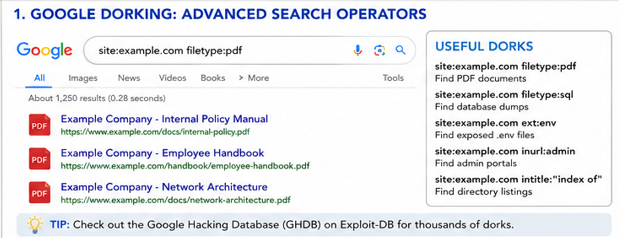
“Google Dorking” is the art of using advanced search operators to force Google to reveal these hidden files. It is completely legal because you are only accessing information Google has already indexed and made public.
Open Google and try these operators:
Finding Exposed Files
Companies often leave backup files or configuration files exposed. These are prime targets for any researcher.
site:example.com filetype:pdf(Finds all PDF documents on the target site—great for finding employee names or internal manuals).site:example.com filetype:sql(Searches for exposed database dumps, a critical find in any operation).site:example.com ext:env(Searches for exposed Laravel.envfiles, which contain raw database passwords).
Finding Login Portals
Sometimes the main website is secure, but a forgotten admin portal is left exposed. This method helps you find those doors.
site:example.com inurl:adminsite:example.com intitle:"Login" OR inurl:login
Directory Listing
If a web server is misconfigured, it might display a list of all files in a directory instead of a webpage. This is a goldmine of information.
site:example.com intitle:"index of"
[!TIP]
The Google Hacking Database (GHDB) maintained by Exploit-DB contains thousands of pre-written Google Dorks used to find specific vulnerabilities, vulnerable IoT cameras, and exposed passwords. It is an essential resource for anyone performing Passive Reconnaissance.
2. Shodan: The Search Engine for Devices
While Google indexes web pages, Shodan indexes devices. This is a fundamentally different and powerful approach to information collection.
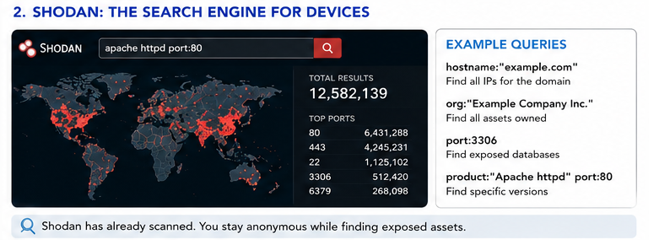
Shodan constantly scans the entire internet, recording every open port, every server banner, and every connected device. It finds webcams, industrial control systems, medical devices, and databases. Shodan is arguably the most powerful tool in existence for silent intelligence gathering.
Because Shodan has already done the scanning, you can query its database to find vulnerabilities without ever scanning the target yourself. This keeps your activity completely undetected.
Go to shodan.io (you can create a free account to unlock search filters):
hostname:"example.com"(Finds all IPs associated with the target).org:"Target Company Name"(Finds all IP blocks owned by the company).port:3306(Finds databases exposed directly to the internet).product:"Apache httpd" port:"80"(Finds specific software versions, useful if you know a particular version is vulnerable).
By cross-referencing your target’s IP addresses with Shodan, you might discover that a developer left a Redis database open on port 6379 without a password. You now have a
Unlock the Remaining 60%
Join the ONICastro Intelligence Hub — completely free.
Get full access to every tutorial and never lose your place.
- Learning Paths synced to your account
- Continue exactly where you stopped
- Completed badges & next recommended step
- Priority access to speedy consultancy