Tutorial 3: Networking for Hackers (TCP/IP, ARP, & Packet Flow)

Lesson notes

Table of Contents
Welcome to Tutorial 3 of the Ethical Hacking & Cybersecurity Masterclass at ONICastro Digital Intelligence. This guide to Networking for Hackers distills complex network theory into the essential knowledge required for modern cybersecurity and ethical hacking.

If you don’t understand how data travels, you cannot intercept it. The networking for hackers tutorial will guide you through the essenrtials.
Many beginners jump straight into running tools like nmap or Wireshark without understanding what the tool is actually doing. When the tool fails—or worse, when it produces a false positive—they are stuck.
A professional hacker understands the underlying mechanics of the network. In this tutorial, we will strip away the complexity of traditional IT networking courses and focus purely on what you need to know to launch network-level attacks.
1. Understanding Networking for Hackers – The Hacker’s OSI Model
The Open Systems Interconnection (OSI) model is a conceptual framework describing how data moves from a software application on one computer to an application on another.
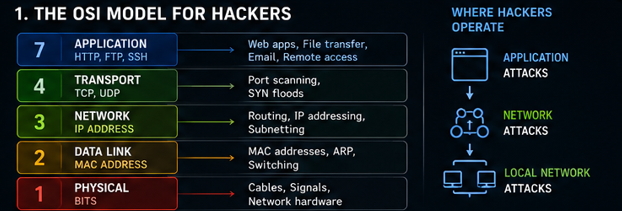
As a hacker, you only need to focus on four critical layers:
- Layer 2 (Data Link): Uses MAC addresses to move data across a local switch (e.g., your home Wi-Fi). This is where ARP Spoofing and Man-in-the-Middle (MITM) attacks occur.
- Layer 3 (Network): Uses IP addresses to route data across the internet (from router to router).
- Layer 4 (Transport): Uses TCP and UDP protocols to establish connections. This is where Port Scanning and SYN Floods occur.
- Layer 7 (Application): Uses high-level protocols like HTTP, FTP, and SSH. This is where SQL Injection and Cross-Site Scripting (XSS) occur.
To properly understand networking for hackers, let’s break down Layers 2, 3, and 4.
2. Layer 3: IP Addresses & Subnetting
An IP Address (e.g., 192.168.56.10) is a logical address used to route data across different networks.
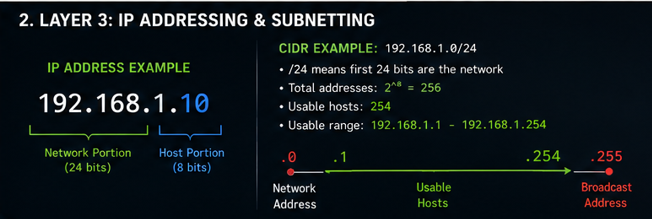
When you perform a penetration test, the client will give you a “Scope of Engagement” formatted in CIDR (Classless Inter-Domain Routing) notation. You must know exactly what this means, or you risk illegally attacking systems outside your scope.
CIDR Notation Explained
If your client says: “You are authorized to test 192.168.1.0/24“
The /24 means the first 24 bits of the IP address are locked (the 192.168.1 part). The remaining 8 bits are for the host machines.
2^8 = 256total addresses.- Minus 2 (one for the network address, one for the broadcast address) = 254 usable IPs.
You are authorized to scan 192.168.1.1 through 192.168.1.254.
If the client gives you a /16 (e.g., 10.10.0.0/16), they are
Unlock the Remaining 60%
Join the ONICastro Intelligence Hub — completely free.
Get full access to every tutorial and never lose your place.
- Learning Paths synced to your account
- Continue exactly where you stopped
- Completed badges & next recommended step
- Priority access to speedy consultancy