Tutorial 5: Active Reconnaissance (Nmap Mastery & Firewall Evasion)

Lesson notes

Welcome to Tutorial 5 of the Ethical Hacking & Cybersecurity Masterclass at ONICastro Digital Intelligence. This guide to Active Reconnaissance will teach you the essential scanning skills required for modern cybersecurity. If passive recon is about watching from a distance, Active Reconnaissance is about knocking on the front door.
In Tutorial 4, we gathered intelligence passively. We mapped the target’s IP addresses and subdomains without ever sending a packet to their servers.
Now, we cross the line.
Active Reconnaissance means directly interacting with the target. You are sending packets to their digital doors to see which ones are open. Because you are communicating directly with the target, their firewalls and Intrusion Detection Systems (IDS) will log your IP address. This is the fundamental shift that defines Active Reconnaissance.
The undisputed king of this phase is Nmap (Network Mapper). In this tutorial, we will master Nmap, moving from basic pings to advanced stealth scanning and service version detection against our Metasploitable VM. By the end, you will have a complete understanding of how Active Reconnaissance works in a real penetration test.
1. The Anatomy of Basic Nmap Scanning for Active Reconnaissance
Boot up both your Kali Linux VM and your Metasploitable VM (ensure both are on the Host-Only network). The first step in Active Reconnaissance is discovering which ports are open.
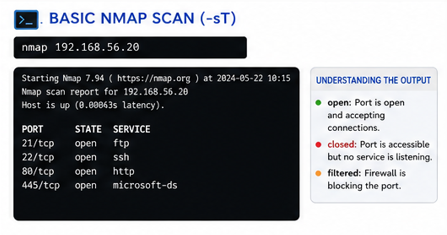
Assuming your Metasploitable VM has the IP 192.168.56.20, open your Kali terminal and run the simplest Nmap command:
nmap 192.168.56.20Nmap will output a list of ports, looking something like this:
PORT     STATE  SERVICE
21/tcp   open   ftp
22/tcp   open   ssh
80/tcp   open   http
445/tcp  open   microsoft-ds
Understanding the Output
- PORT: The door number and the protocol (TCP/UDP).
- STATE:
open: The service is listening and accepting connections.closed: The port is accessible, but no service is listening.filtered: A firewall is blocking Nmap from determining if it is open or closed.- SERVICE: The default application that usually runs on that port.
This basic scan is useful for a quick overview, but it is extremely loud and easily detected. More advanced Active Reconnaissance techniques are required for stealth.
2. The Stealth SYN Scan for Active Reconnaissance (-sS)
In Tutorial 3, we discussed the TCP 3-Way Handshake (SYN -> SYN-ACK -> ACK). Understanding this is critical for Active Reconnaissance.
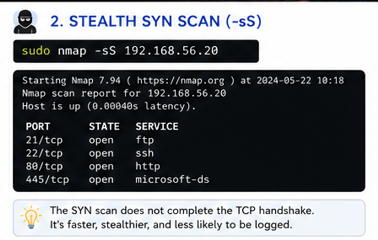
By default, if you do not run Nmap as root, it performs a TCP Connect Scan (-sT). It completes the full 3-way handshake. The target application (like an Apache web server) will log your IP address in its access.log. This is the loudest form of Active Reconnaissance.
To avoid this, we use the Stealth SYN Scan (-sS). This is the preferred method for Active Reconnaissance.
sudo nmap -sS 192.168.56.20Because you use sudo (root privileges), Nmap can craft custom raw packets. It sends a SYN, receives the SYN-ACK, and immediately sends an RST (Reset) to tear down the connection before the application can log it. The handshake never completes.
[!NOTE]
The SYN scan is the default scan if you run Nmap withsudo. It is faster and stealthier than a full connect scan, making it the standard for professional Active Reconnaissance.
3. Service Version Detection (-sV) in Active Reconnaissance
Knowing that Port 22 is open and running SSH is not enough. True Active Reconnaissance requires depth.
Is it running OpenSSH 8.2 (secure)? Or is it running OpenSSH 4.7 (highly vulnerable)? To find exploits, you need the exact version number. This is where Active Reconnaissance moves from discovery to intelligence.
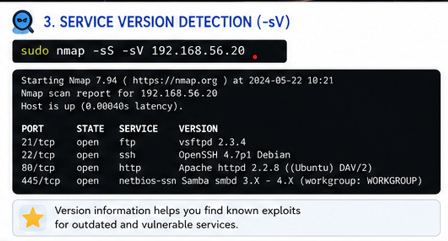
Nmap can interrogate the open ports to grab their “banners” and determine the software version.
sudo nmap -sS -sV 192.168.56.20Now, your output will look like this:
PORT     STATE  SERVICE  VERSION
21/tcp open ftp vsftpd 2.3.4Unlock the Remaining 60%
Join the ONICastro Intelligence Hub — completely free.
Get full access to every tutorial and never lose your place.
- Learning Paths synced to your account
- Continue exactly where you stopped
- Completed badges & next recommended step
- Priority access to speedy consultancy