Tutorial 11: Exploiting Network Services (Metasploit Framework)

Lesson notes

Welcome to Tutorial 11 of the Ethical Hacking & Cybersecurity Masterclass at ONICastro Digital Intelligence. This guide to the Metasploit Framework will teach you how to launch network exploits, deliver payloads, and gain remote access to vulnerable servers. The Metasploit Framework is the most essential tool in any penetration tester’s arsenal.
We are now entering Module 5: Network & Infrastructure Exploitation.
In previous modules, we scanned our target network, enumerated services, and mapped vulnerabilities. Now, we take the final step in the exploitation phase: launching network exploits. This is where the Metasploit Framework becomes indispensable.
Instead of writing exploit payloads from scratch, professionals rely on the Metasploit Framework. Developed and maintained by Rapid7, it is the world’s most widely used penetration testing platform. It contains a database of thousands of validated exploits, payloads, and post-exploitation modules. Mastering the Metasploit Framework separates beginners from professional penetration testers.
In this tutorial, we will master msfconsole (the command-line interface of the Metasploit Framework), explain the difference between Bind and Reverse Shells, and exploit the vulnerable FTP backdoor on our Metasploitable VM.
1. Understanding Shell Types in the Metasploit Framework

When you successfully exploit a service using the Metasploit Framework, your goal is to force the target system to execute a payload that grants you command-line access. This access is called a Shell.
There are two primary ways to establish a shell within the Metasploit Framework:
text
  BIND SHELL:
  [ Kali Attacker ] ────────────── Connects to open port ─────────────► [ Target Server ]
                                                                       (Exploit opens port 4444)

  REVERSE SHELL (Recommended):
  [ Kali Attacker ] ◄────────────── Connects back ──────────────────── [ Target Server ]
  (Listens on port 4444)                                               (Exploit forces connection)
Bind Shell in the Metasploit Framework
The exploit runs on the target and opens a new listening port (e.g., 4444) on the target machine, binding a shell to it. You then connect to that port from your Kali machine. While the Metasploit Framework supports bind shells, they have a major drawback.
- Drawback: Most corporate firewalls block all incoming connections. Even if the exploit succeeds, the firewall will block your connection to port 4444, resulting in a failed exploit.
Reverse Shell in the Metasploit Framework
The exploit forces the target machine to initiate an outgoing connection back to your Kali machine’s listening port. This is the default and recommended payload type in the Metasploit Framework.
- Advantage: Corporate firewalls almost always allow outgoing connections (so servers can download updates or talk to APIs). Reverse shells easily bypass egress firewalls, making them the standard choice for Metasploit Framework exploitation.
2. Navigating msfconsole in the Metasploit Framework
Boot up your Kali Linux VM. Open a terminal and start the Metasploit Framework:
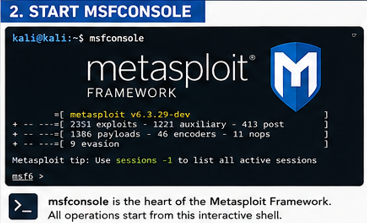
bash
msfconsole
(The framework will take a few seconds to load and display an ASCII art banner).
The msfconsole is the heart of the Metasploit Framework. Every operation you perform starts from this interactive command-line interface.
Core Modules of the Metasploit Framework
Understanding the module structure is essential for effective use of the Metasploit Framework:
- Exploits: Code that takes advantage of a vulnerability to gain access. These are the attack vectors within the Metasploit Framework.
- Payloads: The code that runs after the exploit succeeds (e.g., spawning a shell). Payloads are what the Metasploit Framework delivers to the target.
- Auxiliary: Scanning, sniffing, and administrative tools that don’t exploit vulnerabilities. These support modules expand the Metasploit Framework beyond exploitation.
- Post: Modules used after compromise (like privilege escalation or credential dumping). These make the Metasploit
Unlock the Remaining 60%
Join the ONICastro Intelligence Hub — completely free.
Get full access to every tutorial and never lose your place.
- Learning Paths synced to your account
- Continue exactly where you stopped
- Completed badges & next recommended step
- Priority access to speedy consultancy