Tutorial 6: Service Enumeration (SMB, FTP, SNMP Deep Dive)

Lesson notes
Table of Contents
Welcome to Tutorial 6 of the Ethical Hacking & Cybersecurity Masterclass at ONICastro Digital Intelligence. This guide to Service Enumeration will teach you how to extract critical data from running services before ever launching an exploit. Mastering Service Enumeration is what turns a port scan into actionable intelligence.
In Tutorial 5, our Nmap scan revealed several open ports on our Metasploitable target (192.168.56.20). We know the doors exist. Now we need to see what’s behind them.
Port scanning tells you a door exists. Service Enumeration means walking up to that door, peering through the window, checking if the handle is locked, and seeing if there is a spare key hidden under the mat.
Before we ever launch a malicious exploit, we must ask the service polite questions. Often, due to severe misconfigurations, the service will just hand over the keys to the kingdom without a fight. This is the essence of Service Enumeration.
Boot up your Kali and Metasploitable VMs, and let’s interrogate these services.
1. FTP Enumeration: The Power of Service Enumeration on Port 21
The File Transfer Protocol (FTP) is used to upload and download files. It is often one of the first targets during Service Enumeration.
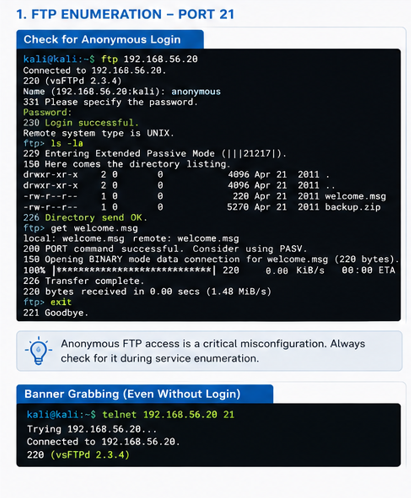
One of the most common—and devastating—misconfigurations in FTP is allowing Anonymous Login. This occurs when an administrator configures the server to allow anyone on the internet to log in using the username anonymous without needing a real password. A thorough Service Enumeration process always checks for this.
Checking for Anonymous Login
Open your Kali terminal and connect to the Metasploitable FTP server:
ftp 192.168.56.20When prompted for a Name, type:
anonymousWhen prompted for a Password, just press Enter (or type any random email address).
If you see 230 Login successful, you are in. This is a textbook win for Service Enumeration.
You can now use standard Linux commands inside the FTP prompt to explore the server’s files:
ls -la      # List files
cd pub      # Change directory
get hidden_file.txt  # Download a file to your Kali machine
exit        # Leave the FTP prompt
If you find a configuration file containing database passwords, you have just compromised the server without writing a single line of exploit code. This is why Service Enumeration is prioritized before exploitation.
FTP Banner Grabbing
Even without anonymous access, the FTP banner itself reveals valuable information during Service Enumeration.
telnet 192.168.56.20 21The server will respond with its software version, like vsftpd 2.3.4. As we noted earlier, this specific version contains a backdoor. Simply knowing the version number through Service Enumeration gives us our attack path.
2. SMB Enumeration: Deep Service Enumeration on Ports 139 and 445
Server Message Block (SMB) is the protocol Windows uses for file sharing and printer sharing (Samba is the Linux equivalent). It is notorious for vulnerabilities like EternalBlue, which powered the WannaCry ransomware. Service Enumeration against SMB is critical.
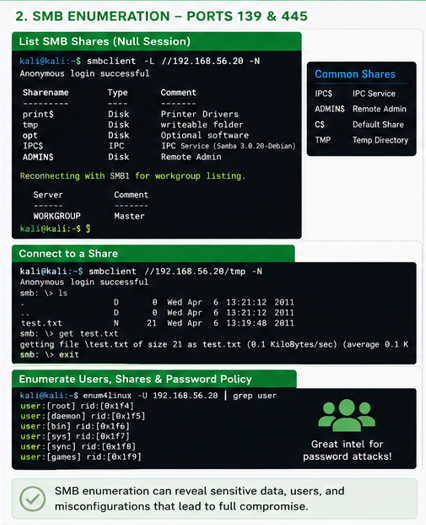
But before exploiting SMB, we check for Null Sessions.
A Null Session allows an unauthenticated attacker to connect to the SMB service and ask it for a list of all network shares, users, and password policies. This is a foundational technique in Service Enumeration.
Listing SMB Shares
We use a tool called smbclient (pre-installed in Kali) for this phase of Service Enumeration.
smbclient -L //192.168.56.20 -N(The -L flag lists shares. The -N flag tells it to use a Null password).
The output will show a
Unlock the Remaining 60%
Join the ONICastro Intelligence Hub — completely free.
Get full access to every tutorial and never lose your place.
- Learning Paths synced to your account
- Continue exactly where you stopped
- Completed badges & next recommended step
- Priority access to speedy consultancy